
1. Release#
1.1. Release v1.3.3#
Modify default scene name to
default.Change the default background.
const appRenderer = new Copper.Renderer(bg);
const defaultScene = appRenderer.getCurrentScene();
console.log(defaultScene.sceneName);
The result should be "default".
1.2. Release v1.3.4#
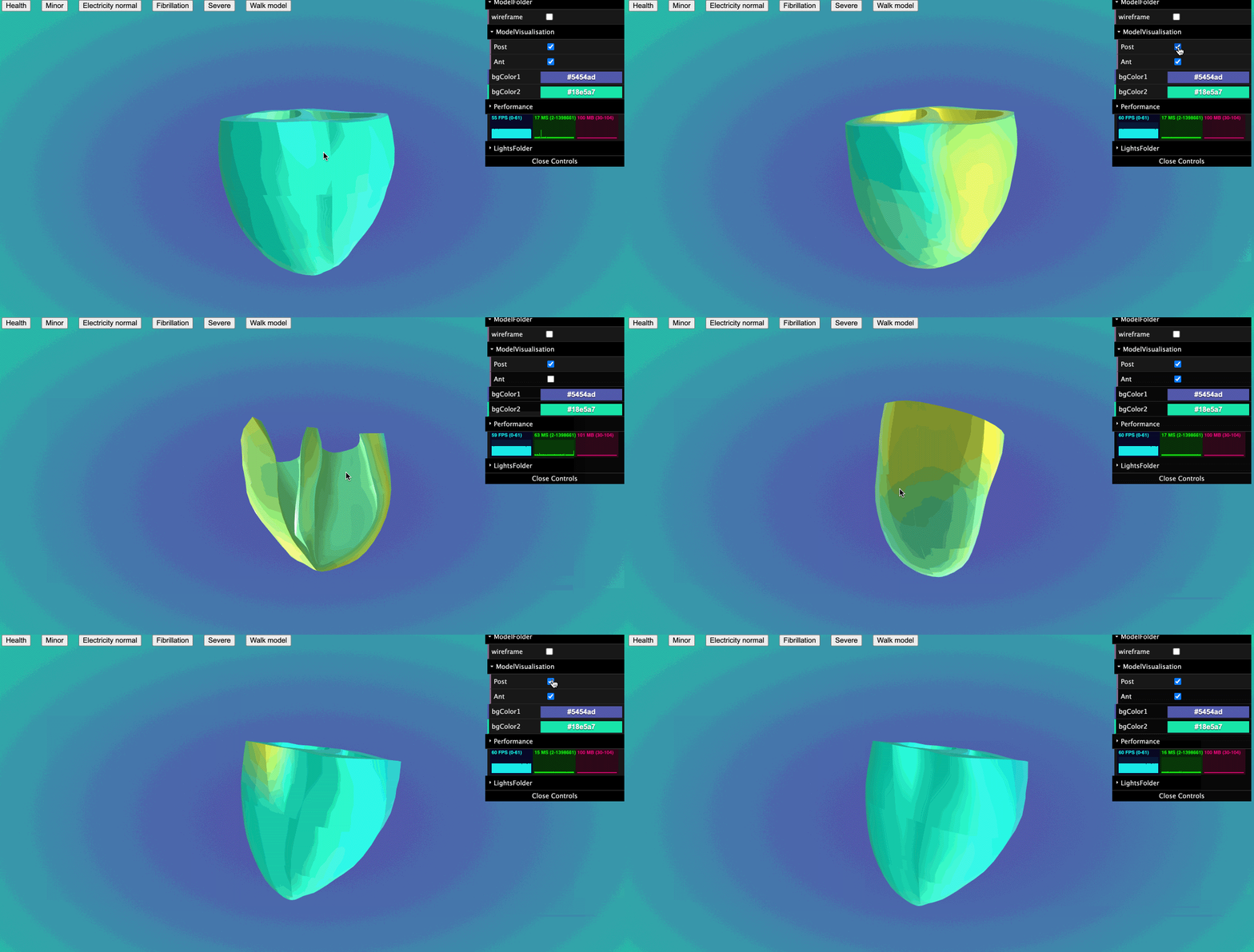
Add a method that can show/hide child mesh.
let scene = appRenderer.createScene(name);
if (child.isMesh) {
  scene.updateModelChildrenVisualisation(child);
}
Update GUI, allows user to show and hide child mesh under ModelFolder->ModelVisualisation folder.
Demo:
1.3. Release v1.4.0#
add camera control in base GUI.
pickModel
use raycaster to select model.
it has a callback function and a optional array parameter to sieve out models that users don’t want.
callback function:it will give the select mesh.see
tutorial - pick model.
add a callback funtion in loadGltf function.
In the callback funtion, you can get your
gltf model.
change class
RenderertocopperRendererchange class
ScenetocopperScene
1.4. Release v1.4.1#
optimise pickModel function.
1.5. Release v1.4.2#
modified pickModel callback function.
if is picked the mesh will be returned. if picked null, the mesh will return undefined.
1.6. Release v1.4.3#
export copperScene type –
copperSceneexport viewpoint type –
CameraViewPointadd updateCamera function
same as loadView function
1.7. Release v1.4.4#
setViewPoint(camera: THREE.PerspectiveCamera,target?: number[])
return viewPoint
getViewPoint()
Returns the default viewpoint, i.e. the viewpoint that was available when the user loaded the model.
resetView()
1.8. Release v1.4.5#
add
isHalfedattribute in copperScenethe default value is
falsewhen user call scene.updateModelChildrenVisualisation(), the value will changed.
1.9. Release v1.5.0#
setPlayRate(playRate:number)
getPlayRate()
retrun current play rate
addLabelToScene(scene, text, x, y, z, scaling)
scene: copperScene
text: string
x,y,z: tag position
scaling: scale
convert3DPostoScreenPos(container: HTMLDivElement | HTMLCanvasElement, camera: THREE.PerspectiveCamera, mesh: THREE.Object3D | THREE.Mesh | THREE.Sprite)
Give a 3D object, it will return a screen postion for you.
convertScreenPosto3DPos(container: HTMLDivElement | HTMLCanvasElement, camera: THREE.PerspectiveCamera, pos: screenPosType)
Give the screen position, it will return a threejs 3d position for you.
you can customise z position.
export two position type
positionType
positionType {
  x: number;
  y: number;
  z: number;
}
screenPosType
screenPosType {
  x: number;
  y: number;
}
Add nrrdloader
loadNrrd(url: string, callback?: (volume: any) => void, opts?: optsType)
optsType:interface optsType { openGui: boolean; container?: HTMLDivElement; }
addBoxHelper(scene: copperScene,volume: any, boxCube?:THREE.Object3D) This function can work with loadNrrd function
More information see tutorial 07
1.10. Release v1.5.1#
fix bug default gui error.
add preRenderCallback function.
1.11. Release v1.5.3#
Optimize render PixelRatio
add a fullscreen method
fullScreenListenner(bg: HtmlDivElement)
document.addEventListener("keydown", (e) => {
  if (e.code === "KeyF") {
    appRenderer.fullScreenListenner(bg);
  }
});
1.12. Release v1.6.0#
update default gui options
appRenderer = new Copper.copperRendererOnDemond(bg, {
  guiOpen: true,
  camera: true,
  performance: true,
  light: true,
});
Optimize resize render performance
add copperRenderOnDemond class
add copperSceneOnDemond class
Minimal memory consumption for on-demand rendering
See tutorial 08
1.13. Release v1.7.0#
Add multiple scenes function.
users can setup mutiple scene in a single page with only one WebGLRenderer and canvas.
update raycaster function
copperMSceneRenderer(bg:HtmlDivElement, 3: numerOfScene);
Useage:
import * as Copper from "gltfloader-plugin-test";
import "gltfloader-plugin-test/dist/css/style.css";
appRenderer = new Copper.copperMSceneRenderer(bg, 3);
See tutorial 09
1.14. Release v1.8.0#
update nrrdloader callback function
currently, it will return
volumeandGUI
fix background error
Add create demo model function in copperMScene class
update controls rotate speed
update addLabelToScene(copperScene,text,x,y,z,scale,fontOption) function
fontOption
  {
      font_size: "50px",
      font: "Raleway",
  }
see toturial 6
1.15. Release v1.8.1#
add setModelPosition(medel:THREE.Group|THREE.Mesh,position:{x:number,y:number,z:number}) in
copperScene.
1.16. Release v1.8.2#
add loadnrrd texture volume method.
1.17. Release v1.8.3#
add kiwrious
add volume mesh in nrrdloader callback function
1.18. Release v1.8.8#
fixed kiwrious error
add kiwrious types
more information see
toturial 10
update nrrdloader function
Now the nrrdloader will not automatcially add slices (x,y,z) for you. But it add a callback function parameter to return x,y,z slices. So, Users can add slices according to their preferences.
see toturial 07
1.19. Release v1.8.10#
update kiwrious copper3d plugin package
add docs for developing nuxtjs
1.20. Release v1.8.11#
optimize raycaster function
add a ispickisPickedModel(camera, container, pickableObjects, mouseMovePosition ) in raycaster
camera: THREE.PerspectiveCamera,
container: HTMLDivElement,
pickableObjects: THREE.Mesh[],
mouseMovePosition: mouseMovePositionType
return: THREE.Object3D<THREE.Event> | null
add pickSpecifiedModel( content, mousePosition) in copperMScene
content: THREE.Mesh | Array<THREE.Mesh>,
mousePosition: mouseMovePositionType
return: THREE.Object3D<THREE.Event> | null
mouseMovePositionType in types
interface mouseMovePositionType {
  x: number;
  y: number;
}
1.21. Release v1.8.12#
fix bugs in copperMScene
use the Array.isArray() instead of using vue isArray()
1.22. Release v1.8.13#
type:
positionType (with optional)
interface positionType {
  x?: number;
  y?: number;
  z?: number;
}
nrrdSliceType, nrrdDragImageOptType and nrrdModeType
type nrrdModeType = "mode0" | "mode1";

interface nrrdDragImageOptType {
  mode?: nrrdModeType;
  showNumber?: boolean;
}
interface nrrdSliceType {
  x: any;
  y: any;
  z: any;
}
copperMScene:
updateCamera() same to copperScene
resetView() same to copperScene
setCameraPosition(position:positionType) Give the position where you want the camera to be located. it will update the camera viewPoint and scene viewPoint. so that you can use resetView() function after.
dragImage(slice: any, opts?: nrrdDragImageOptType)
slice: give the nrrd slice, such as sliceX, sliceY, sliceZopts: it’s optional, default mode is mode1, default showNumber is false. if the showNumber is true, it will create div to display current slice number, you can edit the .copper3d_sliceNumber in css. such as:.copper3d_sliceNumber { top: 50px !important; left: 150px !important; border: 1px solid salmon; border-radius: 10px; padding: 5px; }
loadNrrd(): callback function update, now it add a new parameter to return slices. how to use see tutorial 12.
copperNrrdLoader:
dragImageWithMode(container: HTMLDivElement, controls: TrackballControls, slice: any, opts?: nrrdDragImageOptType): for copperMScene dragImage().
createShowSliceNumberDiv(): for opts.showNumber = true
how to use drag
step1: select the scene that you want to control with your mouse.
step2: press any
shiftkey on your keyborad.step3:
clickyour mouse on nrrd image anddrag.
See tutorial 12 - drag and reset nrrd image.
1.23. Release v1.8.14#
update cursor, when user use drag nrrd function.
change cameraPositionType in copperMSceneRenderer to positionType.
clean code.
1.24. Release v1.8.15#
fixed addlight AmbientLight and DirectionalLight not work in GUI bug.
1.25. Release v1.8.16#
fixed guiOpen = false bug.
1.26. Release v1.8.17#
fixed copperMScene gui bug
developing draw gui
draw gui mode1.
1.27. Release v1.8.18#
developed draw image mode 2 and mode3
now user can draw on canvas.
change the color.
change the drawing size.
use eraser.
clear all drawing.
download current image.
create loading animation.
1.28. Release v1.8.19#
update threejs version to latest.
1.29. Release v1.8.20#
update drawing funtion
currently only has mode2.
add segmentation method.
1.30. Release v1.8.21#
add subview function in copperMScene when we use it, we can call addSubView(), after we initialise copperMSceneRenderer.
Then when the model loaded, we can add it to subScene.
See toturial 14
1.31. Release v1.8.22#
fixed gui bug
update drawing function colors.
1.32. Release v1.8.23#
add vtk loader
create a load multiple vtks function
fixed drawing function bugs.
1.33. Release v1.8.24#
Fixed drawing function bugs
1.34. Release v1.8.25#
add load mutiple vtk files function with animation.
1.35. Release v1.8.26#
update load mutiple vtk files function. Now user should follow this type to sent parameter.
scene?.loadVtks([
  { name: "heart_inner", urls },
  { name: "heart_outer", urls: urls_1 },
]);
add gltf exporter.
1.36. Release v1.9.1#
Main update on Painting function.
fixed clear all function bug.
add brush
more easier to zoom image. (use mouse wheel to zoom).
more easier to pan image. (use mouse right click to pan).
change slice still apply (press shift do not release, then use mouse lift click to drag image).
Add undo funtion. (In GUI click undo, on keyborad using ctrl+z (windows) / command+z(mac) ).
Update core Painting function.
demo
1.37. Release v1.9.2#
update CopperScene
1.38. Release v1.10.0#
create a dicom loader
add render texture 2d method
1.39. Release v1.10.2#
add contrast gui controller in painting function.
1.40. Release v1.10.3#
fix contrast gui with wheel bug.
1.41. Release v1.10.4#
fixed switch slice bug
add control contrast gui on 2d dynamic image.
1.42. Release v1.10.5#
Refactoring paint code
delete drag and draw funtion in copperMScene
now use
new Copper.nrrd_tools()nrrdTools = new Copper.nrrd_tools(volume, nrrdSlices.z); /** * for drag image * */ nrrdTools.dragImageWithMode( sceneIn.container, sceneIn.controls as TrackballControls, { mode: "mode1", showNumber: true, } ); /** * for draw image * */ nrrdTools.draw( sceneIn.container, sceneIn.controls as TrackballControls, sceneIn, sceneIn.gui );
1.43. Release v1.11.0#
update loading function
now we need to create the loading manunally, and we can specify where it appears.
let loadBar: Copper.loadingBarType;
loadBar = Copper.loading();
nrrdTools.mainDisplayArea.appendChild(loadBar.loadingContainer);
sceneIn?.loadNrrd(url, loadBar, funa);
Update nrrdTools
add show contrast display
let nrrdTools: Copper.nrrd_tools;
nrrdTools = new Copper.nrrd_tools(appRenderer.sceneInfos[0].container);
nrrdTools.addContrastDisplay();
nrrdTools.setVolumeAndSlice(volume, nrrdSlices.z);

nrrdTools.dragImageWithMode(sceneIn.controls as TrackballControls, {
  mode: "mode1",
  showNumber: true,
});
nrrdTools.draw(sceneIn.controls as TrackballControls, sceneIn, sceneIn.gui);
appRenderer.sceneInfos[0].addPreRenderCallbackFunction(nrrdTools.start);
1.44. Release v1.11.1#
update the nrrdTools costomer css.
define css class name for each contrast area and main area
we can write our custom css out side
.copper3D_scene_div {
  display: grid;
  grid-template-areas:
    "c1 c2 m m m "
    "c1 c2 m m m "
    "c3 c4 m m m "
    "c3 c4 m m m ";
  gap: 10px;
}
.copper3D_mainDisplay {
  position: relative;
  grid-area: m;
}
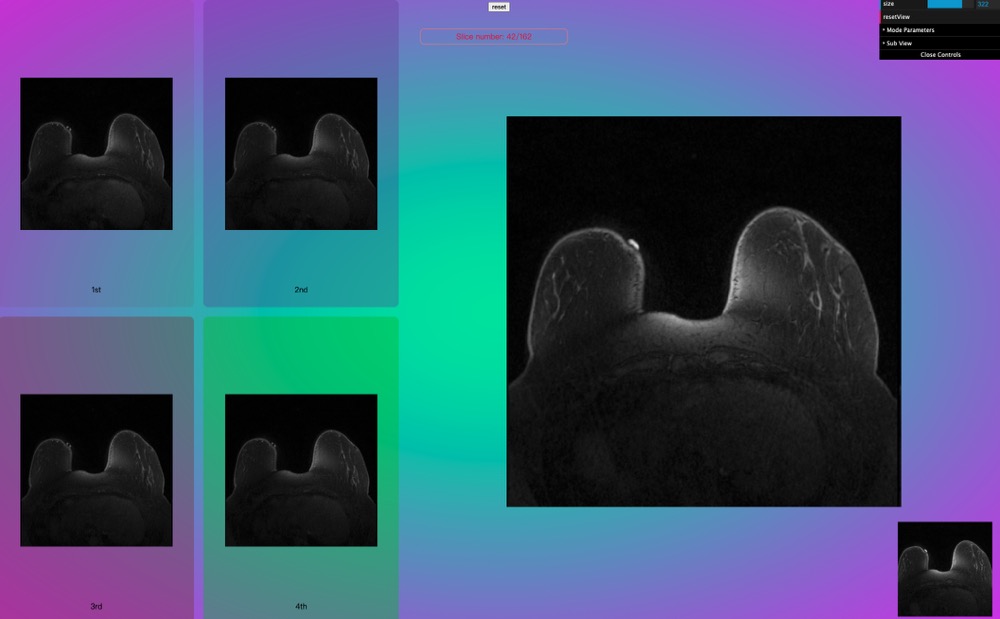
.copper3D_contrast1 {
  grid-area: c1;
  background-color: rgba(130, 39, 39, 0.1);
}
.copper3D_contrast2 {
  grid-area: c2;
  background-color: rgba(102, 51, 153, 0.3);
}
.copper3D_contrast3 {
  grid-area: c3;
  background-color: rgba(126, 60, 60, 0.4);
}
.copper3D_contrast4 {
  grid-area: c4;
  background-color: rgba(45, 192, 19, 0.4);
}
update functions for nrrd contrast
nrrdTools.setContrast1OriginCanvas(nrrdSlices.z);
nrrdTools.setContrast2OriginCanvas(nrrdSlices.z);
nrrdTools.setContrast3OriginCanvas(nrrdSlices.z);
nrrdTools.setContrast4OriginCanvas(nrrdSlices.z);
nrrdTools.setContrastSize(size, size);
nrrdTools.updateContrastArea();
result
1.45. Release v1.11.2#
design drag function for contrast area
design change contrast value function
1.46. Release v1.11.3#
update copperMScene controls
now we can switch the controls outside by using
setControls(1)0: OrbitControls
other numbers: TrackballControls.
appRenderer.sceneInfos[0].setControls(1);
the default controls is OrbitControls now.
if when you switch to TrackballControls, the speed is not that you want, you can adjust it outside by using e.g,
.rotateSpeed = 0.1.
In order to improve the paint performance, remove the requestAnimationFrame function from paint method. Then add
addPreRenderCallbackFunctionin copperMScene. Now when we use nrrd_tools class, after we call the draw function, we need to put thenrrdTools.startin addPreRenderCallbackFunction array to call it in requestAnimationFrame
let nrrdTools: Copper.nrrd_tools;
nrrdTools = new Copper.nrrd_tools(appRenderer.sceneInfos[0].container);
nrrdTools.addContrastDisplay();
nrrdTools.setVolumeAndSlice(volume, nrrdSlices.z);

nrrdTools.dragImageWithMode(sceneIn.controls as TrackballControls, {
  mode: "mode1",
  showNumber: true,
});
nrrdTools.draw(sceneIn.controls as TrackballControls, sceneIn, sceneIn.gui);
appRenderer.sceneInfos[0].addPreRenderCallbackFunction(nrrdTools.start);
1.47. Release v1.11.4#
add callback function for loadDicom, it will return the mesh.
// usrls: required
// callback: optional
// gui: optional
scene.loadDicom(
  urls,
  (mesh) => {
    console.log(mesh);
  },
  gui
);
fixed the loadDicom bug, now the performance has been improved.
add setDepth() in copperScene.
Now, we can use
setDepth(value:number)to set the Dicom texture mesh animation speed.
1.48. Release v1.11.5#
changed loading bar function.
1.49. Release v1.11.6#
update and impove the core painting function.
now the performance get a huge impoved again.
fixed loadingBar issue.
fixed running memory issue .
fixed draw segmentaion circle cause painted image disappear issue.
1.50. Release v1.11.7#
developed show all contrast images in main area.
appRenderer = new Copper.copperMSceneRenderer(bg, 1);
nrrdTools = new Copper.nrrd_tools(appRenderer.sceneInfos[0].container);
nrrdTools.setContrastDisplayInMainArea();
For how to address multiple loadingBar issue, we can just create one loadingBar, then use this loadingBar in each NRRD loader.
loadBar1 = Copper.loading();
nrrdTools.mainDisplayArea.appendChild(loadBar1.loadingContainer);
sceneIn?.loadNrrd(
  "/copper3d_examples/nrrd/segmentation/ax dyn 1st pass.nrrd",
  loadBar1,
  contrast1Area
);
sceneIn?.loadNrrd(
  "/copper3d_examples/nrrd/segmentation/ax dyn 2nd pass.nrrd",
  loadBar1,
  contrast2Area
);
sceneIn?.loadNrrd(
  "/copper3d_examples/nrrd/segmentation/ax dyn 3rd pass.nrrd",
  loadBar1,
  contrast3Area
);
Fixed undo issue.
Optimised dicom loader.
1.51. Release v1.11.8#
fixed dicom loader disoder issue after load all dicom files.
the default order is ascending order.
add set order function in copperScene.
scene.setDicomFilesOrder("descending"); // value => "ascending" | descending
// set order must before load function
scene.loadDicom(
  urls,
  (mesh) => {
    console.log(mesh);
  },
  gui
);
1.52. Release v1.11.9#
Refactoring the nrrd_tools drag function code.
now we can use click function to switch slices.
// must be call before updateIndex function
nrrdTools.setSyncsliceNum();
// sliceNum: changed slice move step
nrrdTools.updateIndex(sliceNum);
add a getMaxSliceNum() function.
this function will return the total number of slices.
let max = ref(0);
max.value = nrrdTools.getMaxSliceNum();
1.53. Release v1.11.10#
Removing
nrrdTools.updateIndex(sliceNum);function.Now we use this function instead, and no longer using
setSyncsliceNum()before call it.
//nrrdTools.setSyncsliceNum(); // no longer to use it.
nrrdTools.setSliceMoving(sliceNum);
fixed painting bug when using click function to switch slices.
1.54. Release v1.11.11#
fixed the mouse wheel bug.
Now, when user use mouse wheel to resize the painting area, the painting function will aotumatically stop after one second.
1.55. Release v1.11.12#
add css classname
copper3D_loading_progressfor progress text.Now, user can customise the text colors.
.copper3D_loading_progress {
  color: crimson !important;
}
1.56. Release v1.11.13#
Modify
loadDicomfunction in copperScene.remove
guiandcallbackparametersusing opts to instead.
optsType:
interface dicomLoaderOptsType {
  gui?: GUI;
  getMesh?: (mesh: THREE.Mesh) => void;
  setAnimation?: (
    currentValue: number,
    depth: number,
    depthStep: number
  ) => number;
}
How to use now:
scene.loadDicom(urls, {
  gui,
  getMesh(mesh) {
    console.log(mesh);
  },
  setAnimation(currentValue, depth, depthStep) {
    currentValue += depthStep;
    if (currentValue > depth) {
      currentValue = 0;
    }
    return currentValue;
  },
});
optimise the preRenderCallbackFunction.
The problem of repeatedly adding functions can now be circumvented.
The usage is same as before.
1.57. Release v1.11.14#
Modify the nrrd_tools
setVolumeAndSlice(volume: any, slice: any, notMainArea?: boolean)with a optional parameter.if you want to render all contrast nrrd in a same page, you can sent
trueto third parameter.How to use it see
Tutorial 15
Add a brush Mouse Assistance System.
1.58. Release v1.11.15#
change back
setVolumeAndSlice(volume: any, slice: any, notMainArea?: boolean)tosetVolumeAndSlice(volume: any, slice: any).add drag sensitive attribute in GUI.
1.59. Release v1.11.17#
optimise Nrrd_tools GUI
optimise drag sensitive parameter
1.60. Release v1.11.18#
Set Nrrd tools subview default to none.
1.61. Release v1.11.19#
rewrite copperScene
add all common methods in commonSceneMethod class. Then let copperScene and copperMScene to extends it.
1.62. Release v1.11.20#
update nrrd tools getMaxslice method.
changed the nrrd tools
setContrastDisplayInMainArea(filesNum: number)method.now you need to tell the tool, how many files you uploaded.
nrrdTools.setContrastDisplayInMainArea(5);
1.63. Release v1.11.21#
add a
redrawPreCanvas()method in nrrd_tools.this is used for hide/show contrast function.
1.64. Release v1.11.22#
remove
redrawPreCanvas()make
redrawDisplayCanvas()private to public. And use it to instead of redrawPreCanvas()rewrite
redrawDisplayCanvas()changed mask, now one mask used for all contrast images.
1.65. Release v1.11.23#
update brush Mouse Assistance System
changed filled to outlined.
1.66. Release v1.11.24#
add a callback function in nrrd_tools
dragImageWithModeopts parameter.now through the callback (getSliceNum) function we can get slice and contrast number.
let immediateSliceNum = ref(0);
let contrastNum = ref(0);
const getSliceNum = (index: number, contrastindex: number) => {
  immediateSliceNum.value = index;
  contrastNum.value = contrastindex;
};

nrrdTools.dragImageWithMode(scene?.controls as TrackballControls, {
  mode: "mode1",
  showNumber: true,
  getSliceNum,
});
Changed the way drag and paint operate
users can use mouse left click to drag.
if paint, users need to press shift key, then paint the image.
changed the default drag sensitive value to 50.
1.67. Release v1.11.25#
fixed the nrrd_tool bugs:
[x] (Solved) paint on contrast images: after painting and switching images, the before-painting things will disappear!
[x] (Solved) zoom: After using the drag function, the wheel function will fail to work.
[x] (Solved) loose focus: every time switch between GUI and paint area, the mouse will lose focus on the paint div.
Fixed the subview gui issue.
before, if user not choose to use subview function, the subview gui will continue appear in GUI.
now solved!
provide a reset main paint area size API for user in nrrd_tool.
const resetMainAreaSize = (factor: number) => {
  nrrdTools.setMainAreaSize(factor);
};
1.68. Release v1.11.26#
Fixed the bug:
Mouse wheel function has conflict with drag function on Mac.
1.69. Release v1.11.27#
Refactoring nrrd_tools code
now when we use nrrd_tools,
nrrd_c = $refs.nrrd_c;
nrrdTools = new Copper.nrrd_tools(nrrd_c);
watchEffect(() => {
  if (
    readyMain.value &&
    readyC1.value &&
    readyC2.value &&
    readyC3.value &&
    readyC4.value
  ) {
    console.log("All files ready!");
    allSlices.sort((a: any, b: any) => {
      return a.order - b.order;
    });

    nrrdTools.setAllSlices(allSlices);
    const getSliceNum = (index: number, contrastindex: number) => {
      immediateSliceNum.value = index;
      contrastNum.value = contrastindex;
    };
    nrrdTools.drag({
      showNumber: true,
      getSliceNum,
    });
    nrrdTools.draw(scene as Copper.copperScene, gui);
    scene?.addPreRenderCallbackFunction(nrrdTools.start);
    max.value = nrrdTools.getMaxSliceNum()[0];
  }
});
As for the drag:
removed mode parameter, and controls
In terms of draw:
remove controls parameter
more info see tutorial 16
1.70. Release v1.11.28#
fixed download image issue!
1.71. Release v1.11.29#
update docs
delete useless code in nrrd_tools
impove the performance!
1.72. Release v1.11.30#
update tutorial 16
update setShowInMainArea()
now when use this function, it will automatically call redrawMianPreOnDisplayCanvas()
add getIsShowContrastState()
return showContrast state: boolean
const status = nrrdTools.getIsShowContrastState();
if (status) {
  max.value = nrrdTools.getMaxSliceNum()[1];
} else {
  max.value = nrrdTools.getMaxSliceNum()[0];
}
add
setSliceOrientation(axis: "x" | "y" | "z")functionswitch x,y,z orientation for slices
const resetSlicesOrientation = (axis: "x" | "y" | "z") => {
  nrrdTools.setSliceOrientation(axis);
  const status = nrrdTools.getIsShowContrastState();
  if (status) {
    max.value = nrrdTools.getMaxSliceNum()[1];
  } else {
    max.value = nrrdTools.getMaxSliceNum()[0];
  }
};
1.73. Release v1.11.31#
fixed switch nrrd orientation slice num bug
1.74. Release v1.11.32#
set dragSensitivity default value to 75.
set the init slice index value to half of max index num.
1.75. Release v1.11.33#
fixed the pan function bug issue:#109
fixed the painting function bug issue:#110
1.76. Release v1.11.34#
modified the redrawMianPreOnDisplayCanvas()
when use it, it will aotumatically resize the mainArea.
Add a clear method in nrrd_tools
this function is called to reset all parameters in nrrd_tools. In order to reload other nrrd files for preparation.
nrrdTools.clear();
nrrdTools.setAllSlices(allSlices);
if (firstLoad) {
  nrrdTools.drag({
    showNumber: true,
    getSliceNum,
  });
  nrrdTools.draw(scene as Copper.copperScene, gui);

  scene?.addPreRenderCallbackFunction(nrrdTools.start);
} else {
  nrrdTools.redrawMianPreOnDisplayCanvas();
}
firstLoad = false;
solved issues #86 #87
As for how to use, see tutorial 16.
1.77. Release v1.12.0#
reset segmentation for painting function default method.
build addSkip and removeSkip method in nrrd_tools for user to switch contrast outside.
how to use, see tutorial 16.
1.78. Release v1.12.1#
optimise nrrd_tools.
Fixed some potential bugs. such as:
cannot find out mainPreSlice.
slice index update errors.
1.79. Release v1.12.2#
update nrrd_tools GUI layout
1.80. Release v1.12.3#
add a confirm box when using clearAll function in nrrd_tools.
1.81. Release v1.12.4#
set the default opacity to 0.5
add arrow keys (up & down) to switch slices.
add a reset zoom button in the GUI.
renamed the clearAll to clear, and add a warning confirmation box with using this function.
add a clearAll function in GUI, to clear all paintings.
1.82. Release v1.12.5#
fixed bug:
reset zoom, after changing the slice’s orientation, the size will back.
1.83. Release v1.12.6#
changed arrow key logic for switching slices:
up to decrease slice’s number.
down to increase slice’s number.
fixed the performance issue on drag slice and painting function.
dynamicaly remove the timer
fixed bug: images contrast not work with selecting contrast function.
1.84. Release v1.12.7#
reset opacity to 0.35.
remove warning msg for clear function.
1.85. Release v1.12.8#
reset opacity to 0.7.
modify Zoom function to fixed-point magnification base on mouse position.
Repackaged nrrd slice:
slice.initIndexZ
slice.initIndexY
slice.initIndexX
slice.ratioZ
slice.ratioY
slice.ratioX
add a ratio attribute in slice to help converting RSADimention to nomal Dimention.
fixed the slice index bug.
1.86. Release v1.12.9#
add mouse cursor option in nrrd_tools GUI.
1.87. Release v1.12.10#
update nrrd_tools GUI opacity.
1.88. Release v1.12.11#
fixed all NRRD slice index error.
threejs environment is base on RSADimention to render the nrrd each slices. But in this way, The slice presented by threejs does not match the real nrrd slice. Actually, one nrrd slice should represent one dicom file image. Thus, we need use
voxel spacingto fix this issue.Suppose we want to get the index 10 slice image. which is 10th dicom file image. Using multiplication: we can use the index 10 to times voxel spacing to get the 10th dicom file image in threejs environment.
update copper3d nrrd loader, in order to match the real nrrd slice, all position max slice index minus 1.
update nrrd_tools GUI some parameters name.
1.89. Release v1.12.12#
fixed switch display contrasts issues
using a skipSlicesDic dictionary to store all remain contrast images, and the removed contrast images’ index numbers.
add a skipSlicesDic type.
add a clearDictionary() function to reset dictionary.
1.90. Release v1.12.13#
remove useless code.
1.91. Release v1.12.14#
remove arrow key function in nrrd tools.
add using cursor function to selete the point position on NRRD slice via crosshair.
press
son keyboard to use this function.
1.92. Release v1.12.15#
Add basic logic for crosshair system.
Now when using crosshair system mode, when user click the cursor on nrrd slice and use the switch orientation function, the next position’s slice index will base the click point.
1.93. Release v1.12.16#
fixed the crosshair system bug.
add
getCurrentSlicesNumAndContrastNum(), it will return current index number and contrast index number.
1.94. Release v1.12.17#
solved the crosshair Inaccuracy issue.
Notice: the real cursor x is releted slice’s RASDimension, but in copper3d system the slice index is releted to slice’s dimension. So we need to do some convert things!
z -> x: slice_z cursor x is slice_x’s index, so we need to convert cursor x to slice’s dimension format. slice_z’s index is slice_x cursor x, so we need to convert the dimention to RASDimention.
z -> y: slice_z’s cursor y is slice_y’s index slice_z’s index is slice_y’s cursor y
x -> z: slice_x’s cursor x is slice_z’s index slice_x’s index is slice_z’s cursor x
x -> y: slice_x’s cursor y is slice_y’s index slice_x’s index is slice_y’s cursor x
y -> z: slice_y’s cursor y is slice_z’s index slice_y’s index is slice_z’s cursor y
y -> x: slice_y’s cursor x is slice_x’s index slice_y’s index is slice_x’s cursor y
1.95. Release v1.12.18#
Add cursor dot in nrrd_tools GUI.
1.96. Release v1.12.19#
set default cursor to dot in nrrd_tools.
1.97. Release v1.12.20#
Modify the drag method logic in nrrd_tools.
now when user enable the showContrast (nrrdTools.setShowInMainArea(true)), the last slice’s index contrast image will disable the drag function.
1.98. Release v1.12.21#
Changed the store image to original size.
1.99. Release v1.12.22#
Solved the precise issue on crosshair function.
1.100. Release v1.12.23#
Change the data type of the storing mark data.
initially, we use HTMLImageElement to store the mark data, but this method only can be used in canvas’s ctx.drawImage() function. And we are very hard to get the image data.
Then we changed to use ImageData type to store the marks’ pixel data. And this method we cannot use the canvas’s ctx.drawImage() function anymore, we can only use the ctx.putImageData() instead. The benefit for use this function is that we can easily to write and read marked data.
1.101. Release v1.12.24#
Add the switch view with the 3D marks function.
achieve Z -> X, Z -> Y.
Basic solution for this: As for Z to X:
The slice Z’s each x’s pixels are related to each slice X. So we can through the slice Z to get each cols’ data, then we can base on the x’s pixels to find out the slice X index. Finnally, we can get currently slice Z’s index, and use it to find out which col’s data should be replaced in slice X.
1.1 get the cols’ 2d array for slice x
1.2 get x axis ratio for converting, to match the number slice x with the slice z’s x axis pixel number.
1.3 convert the slice Z’s index and to identify which row/col data should be replace.
1.4 Maping slice x’s index to slice z x/col coordinates. To find which index of slice x and which col’s data should be replaced.
Core algorithms:
for (let i = 0, len = this.nrrd_states.dimensions[0]; i < len; i++) {
  const index = Math.floor(i * ratio_a);
  const convertImageArray = this.paintImages.x[i].image.data;
  const mark_data = marked_a[index];
  const base_a = this.nrrd_states.nrrd_z * 4;
  for (let j = 0, len = mark_data.length; j < len; j += 4) {
    const start = (j / 4) * base_a + convertZIndex * 4;
    convertImageArray[start] = mark_data[j];
    convertImageArray[start + 1] = mark_data[j + 1];
    convertImageArray[start + 2] = mark_data[j + 2];
    convertImageArray[start + 3] = mark_data[j + 3];
  }
}
In terms of Z to Y:
The slice Z’s each y’s pixels are related to each slice Y. So we can through the slice Z to get each rows’ data, then we can base on the y’s pixels to find out the slice Y index. Finnally, we can get currently slice Z’s index, and use it to find out which row’s data should be replaced in slice Y.
2.1 get the rows’ 2d array for slice y.
2.2 get y axis ratio for converting.
2.3 convert the slice Z’s index and to identify which row/col data should be replace.
2.4 Maping slice y’s index to slice z y/row coordinates. To find which index of slice y and which row’s data should be replaced.
Core algorithms:
for (let i = 0, len = this.nrrd_states.dimensions[1]; i < len; i++) {
  // Closest index share same mark data. Because the real slice's index is gearter than the image each axis pixels numbers.
  const index = Math.floor(i * ratio_b);
  // find out each slice Y's image
  const convertImageArray = this.paintImages.y[i].image.data;
  // find out which marked data should be used, base on the slice Y's index
  const mark_data = marked_b[index];
  // find out the rows which need be replaced in identify image.
  const start = this.nrrd_states.nrrd_x * convertZIndex * 4;
  for (let j = 0, len = mark_data.length; j < len; j++) {
    convertImageArray[start + j] = mark_data[j];
  }
}
1.102. Release v1.12.25#
Add export marks function.
export all x,y,z views marks image arrays with three json files.
use file-saver npm package.
1.103. Release v1.12.26#
Filped the Slice X Y Z images.
Reordered the Slice Y and Slice X.
Achieved the transfer function
Slice z to x, y.
Slice y to x, z.
Slice x to y, z.
More information see features 07_nrrd_transfer_function
1.104. Release v1.12.27#
Fixed flip the slice image issue.
1.105. Release v1.13.0#
almost finished the transfer function in nrrd_tool.
create a new package copper3d_plugin_nrrd to support load the nrrd files with a right size.
1.106. Release v1.13.3#
fixed nrrd plugin import issue.
1.107. Release v1.13.5#
impoved the nrrd plugin
fixed the 16 bits nrrd axis cannot found issue
remove the code axis = [”x”,”y”,”z”] in the nrrdloader class.
1.108. Release v1.13.6#
rewrite the export function
only export axis z slices’ masks.
export with centimeter image, not base onthe pixel.
1.109. Release v1.13.7#
debug windows
1.110. Release v1.13.9#
remove the gltf-exporter for test in nuxt.js
1.111. Release v1.13.10#
solved the eraser size issue.
add opts in draw function.
interface nrrdDrawImageOptType {
  getMaskData?: (
    masks: paintImageType[],
    len: number,
    width: number,
    height: number
  ) => void;
}
We can use this callback function to get the mask data.
1.112. Release v1.13.11#
Fixed copperRenderer gui ModelVisualisation bug.
update the copperRenderer optional type.
interface optType {
  guiOpen: boolean;
  camera?: boolean;
  performance?: boolean;
  light?: boolean;
  [key: string]: string | boolean | undefined;
}
1.113. Release v1.13.12#
Fixed gui repeat issue
1.114. Release v1.13.13 - version for Nuxt - heart app#
removed Gltf exporter, because it cannot be build in Nuxt app.
Update the vtkloader
modified the opts, now we can customise the material
wireframe,color,transparent, andopacity.scene?.loadVtks([ { name: "heart_inner", urls, opts: { wireframe: true, color: "#cccccc" }, }, { name: "heart_outer", urls: urls_1, opts: { wireframe: false, color: "rgb(214, 211, 212)", transparent: true, opacity: 0.5, }, }, ]);
types
interface IOptVTKLoader {
  wireframe?: boolean;
  color?: string | number;
  transparent?: boolean;
  opacity?: number;
}
Update the dicom loader
we can use
getMesh,getCopperVolumein copperSence.loadDicom() opts.scene.loadDicom(urls, { gui, getMesh(mesh) { console.log(mesh); }, getCopperVolume(copperVolume, updateTexture) { copperVolume.windowWidth = 424; copperVolume.windowCenter = 236; updateTexture(copperVolume); }, setAnimation(currentValue, depth, depthStep, copperVolume) { currentValue += depthStep; if (currentValue > depth) { currentValue = 0; } return currentValue; }, });
optsType:
interface dicomLoaderOptsType {
  gui?: GUI;
  getMesh?: (mesh: THREE.Mesh) => void;
  getCopperVolume?: (
    copperVolume: copperVolumeType,
    updateTexture: Function
  ) => void;
  setAnimation?: (
    currentValue: number,
    depth: number,
    depthStep: number,
    copperVolume: copperVolumeType
  ) => number;
}
We can in getCopperVolume() function to update the volume windowWidth and windowCenter
1.115. Release v1.13.14#
re-add the export gltf function.
use these version to develop the nrrd tools app.
1.116. Release v1.13.15 - version for Nuxt - heart app#
add an alpha attribute(optional) in options, when create a copper render.
appRenderer = new Copper.copperRenderer(bg, {
  guiOpen: true,
  camera: true,
  performance: true,
  light: true,
  alpha: true,
});
add a setClearColor function in copper render.
baseRenderer.setClearColor(clearColor?: number, alpha?: number): void
the default value is clearColor: 0x000000, alpha: 0
1.117. Release v1.13.16 - version for Nuxt - heart app#
fixed the gui bug
1.118. Release v1.13.17#
add web worker in nrrd tools for export/download masks.
1.119. Release v1.13.18#
reset web worker url
add a remove prerender callback function
const a = () => {
  console.log("a");
};
const index = scene.addPreRenderCallbackFunction(a);
setTimeout(() => {
  scene?.removePreRenderCallbackFunction(index);
}, 3000);
// if we want add the a function again
setTimeout(() => {
  if ((a as any).id) {
    (a as any).id = undefind;
  }
  index = scene.addPreRenderCallbackFunction(a);
}, 3000);
1.120. Release v1.13.20#
test web worker
add rollup-plugin-worker
remove logs
1.121. Release v1.13.21#
fixed the export mask data no data value bug.
1.122. Release v1.13.22#
update nrrd tools
getVoxelSpacing()
getSpaceOrigin()
1.123. Release v1.13.23#
update nrrd_tools draw callback function
now we can get current mask image, slice number, image width/height.
const getMaskData = (
  image: ImageData,
  sliceId: number,
  width: number,
  height: number
) => {
  console.log(image);
  console.log(sliceId);
};
nrrdTools.draw(scene as Copper.copperScene, gui, { getMaskData });
1.124. Release v1.13.24#
update the setMaskData() in nrrd tools
1.125. Release v1.13.25#
update nrrd_tools eraser and it’s size response speed
now it can quick response when user drag the brushAndEraserSize slider.
1.126. Release v1.13.26#
fixed the nrrd_tools images disappear issue!
1.127. Release v1.13.27#
add a clearAllFlag in getMask() function
users can get the flag outside
1.128. Release v1.13.28#
update getMask() type
1.129. Release v1.13.29#
fixed the load mask function bug.
if load a empty mask accidentally, there is no bugs any more!
1.130. Release v1.13.30#
the display panel doesn’t reset to centre after select nrrd contrast images.
fixed bugs:
Drag panel (right click) response speed too slow.
Right click to drag panel not work initially, only work after using zoom. Now everything works well.
1.131. Release v1.13.31#
add a objloader
1.132. Release v1.13.32#
update copper3d_nrrd_loader
fixed the space issue.
1.133. Release v1.13.33#
update the copperNrrdLoader with segmentation.
copperNrrdLoader(
  url: string,
  loadingBar: loadingBarType,
  segmentation: boolean,
  callback?: (
    volume: any,
    nrrdMeshes: nrrdMeshesType,
    nrrdSlices: nrrdSliceType,
    gui?: GUI
  ) => void,
  opts?: optsType
)
sceneIn?.loadNrrd(url, loadBar1, false, funa, opts);
1.134. Release v1.14.0#
Update objloader.
now the callback function works.
can get mesh out side.
Update CopperMScene.
set the trackball control as default controller.
Update copper3d_nrrd_plugin.
display as micorns, not the pixels.
pixels * spacing = mm
addressed the threejs loader to load the 16-bits nrrds.
addressed the spacing issue among each direction of nrrd.
Update nrrd_tools to fit the new nrrd volume format by threejs loader.
drag function.
paint function.
save mask data function.
undo function.
crosshair function.
1.135. Release v1.14.1#
fixed the nrrd_tools load mask issue.
update default nrrd gui.
now it base on mm slice number.
update nrrd plugin based on threejs team suggestions.
1.136. Release v1.14.2#
fixed the slice order issue, when we drag the slice down.
1.137. Release v1.14.3#
Develop a multi-label function for nrrd tools
Function updated:
undo
eraser
clear
resize
store mask
draw lines / segmentation
upload mask data
add a variable to get store all labels masks.
storedPaintImages: storedPaintImagesType = {
  label1: this.paintImagesLabel1,
  label2: this.paintImagesLabel2,
  label3: this.paintImagesLabel3,
};
1.138. Release v1.14.4#
Fixed bug: draw lines not continuous on label 1, 2, 3.
1.139. Release v1.14.5#
Fixed GUI overload issue in copperNrrdLoader.
1.140. Release v1.14.6#
move pickSpecifiedModel function into commonSceneMethod class.
1.141. Release v1.14.7#
Add setEraserUrls(urls:string[]) in nrrd_tools
this is for customise the eraser images and offline.
Add new workflow for auto-label and auto-release.
1.142. Release v1.14.8#
add prerender function in copperRenderer.
remove gltf exporter for nuxt
1.143. Release v1.14.9#
update threejs latest version.
1.144. Release v1.14.10#
fixed the bugs on copperRender after remove GltfExporter.
1.145. Release v1.15.0#
Update the texture2d with nrrd volume methode.
Use this function directly by Copper3d createTexture2D_NRRD
Update texture3d method, add it into copperScene.
Rewrite Threejs trackballcontrols.
The functions are same as the threejs one.
Add new fingers functions on touchscreen part.
one finger rotate
two fingers zoom/pan
three fingers pan
1.146. Release v1.15.1#
add a option to copperRender
allow user to choose which controls they would like to use.
threejs TrackballControls
copper3dTrackballControls
threejs OrbitControls
1.147. Release v1.15.2#
fixed the copper3dTrackballControls bug
1.148. Release v1.15.3#
test copper3dTrackballControls bug
1.149. Release v1.15.7#
Fixed the copper3dTrackballControls bug
no more bugs on phone.
1.150. Release v1.15.8#
clean code.
update the copperRender/copperScene opts.
interface ICopperRenderOpt {
  guiOpen: boolean;
  cameraGui?: boolean;
  performanceGui?: boolean;
  lightGui?: boolean;
  alpha?: boolean;
  controls?: "copper3d" | "trackball" | "orbit";
  cameraType?: "perspective" | "orthographic";
  [key: string]: string | boolean | undefined;
}
interface ICopperSceneOpts {
  controls?: "copper3d" | "orbit" | "trackball";
  camera?: "perspective" | "orthographic";
  alpha?: boolean;
}
Now the copperRender/copperScene support two type of cameras
"Perspective" | "Orthographic". - The default camera is Perspective. - If you want to use Orthographic, when you create the copperRender you can do like this:appRenderer = new Copper.copperRenderer(bg, { guiOpen: true, cameraGui: true, cameraType: "orthographic", });
1.151. Release v1.15.9#
Solved the issue #238, the window size not change the camera issue.
1.152. Release v1.15.10#
add switchAllSlicesArrayData() for switch all images data and keep the default settings, for registration images.
// generate by nrrd loader
interface nrrdSliceType {
  x: nrrdslice;
  y: nrrdslice;
  z: nrrdslice;
}
const data = [
  nrrdSliceType,
  nrrdSliceType,
  nrrdSliceType,
  nrrdSliceType,
  nrrdSliceType,
];
nrrd_tools.switchAllSlicesArrayData(data);
1.153. Release v1.15.11#
add a new option
fpsfor copperRenderinterface ICopperRenderOpt { guiOpen: boolean; cameraGui?: boolean; performanceGui?: boolean; lightGui?: boolean; alpha?: boolean; controls?: "copper3d" | "trackball" | "orbit"; cameraType?: "perspective" | "orthographic"; fpsMode?: "0" | "1"; [key: string]: string | boolean | undefined; }
now you can switch into different fps mode control.
allow users to set their fps.
setFPS(fps: number) {
  this.fps = fps;
}
copperRender.setFPS(60);
For nrrd tools, allow user to get main canvas containor div, drawing canvas, and nrrd_states object.
   getContainer() {
    return this.mainAreaContainer;
    }
   getDrawingCanvas() {
      return this.drawingCanvas;
    }
   getNrrdToolsSettings() {
      return this.nrrd_states;
    }
1.154. Release v1.15.12#
optimse nrrd_tools class code, more easy to maintain.
add a sphere function in nrrd_tools
in sphere mode:
user can not zoom/switch index/annotate on image
there are two modes:
A(default): draw single circle in three views
B: draw a series of circles in Axial view, use save/crosshair function to draw on other views.
if you want to switch these mode in code:
nrrd_tools.spherePlanB = false; // mode A
nrrd_tools.spherePlanB = true; // mode B
1.155. Release v1.15.13#
clean code
when user disable sphere, clear all sphere on canvas.
1.156. Release v1.15.14#
set use sphere b mode to default
update sphere mode
now it has itself canvas.
now it donot need the transifer function.
1.157. Release v1.15.15#
fixed bug: when using sphere function to draw with mouse wheel, the sphere origin will change bug.
1.158. Release v1.15.16#
clean code
add a MeshNodeTool in copper3d.
to convert old app nodes to easily using kdtree.
in untils
calclulate Euclidean distance n dimensions
calcDistance(x0: number[], x1: number[])
Cubic-Hermite basis function.
H3(x: number)
Cubic-Lagrange basis function.
L3(x:number)
1.159. Release v1.15.17#
solved trackball controls issue:
now the users can customize the mouse behaviours,
type
mouseButtons: {
  LEFT: MOUSE.ROTATE | MOUSE.PAN | -1;
  MIDDLE: MOUSE.DOLLY;
  RIGHT: MOUSE.ROTATE | MOUSE.PAN | -1;
}
examples
//default
controls.mouseButtons = {
  LEFT: MOUSE.ROTATE,
  MIDDLE: MOUSE.DOLLY,
  RIGHT: MOUSE.PAN,
};
//cs 01
controls.mouseButtons = {
  LEFT: MOUSE.PAN,
  MIDDLE: MOUSE.DOLLY,
  RIGHT: MOUSE.ROTATE,
};
// cs 02
controls.mouseButtons = {
  LEFT: -1, // disable it
  MIDDLE: MOUSE.DOLLY,
  RIGHT: MOUSE.ROTATE,
};
1.160. Release v1.15.18#
Add a new option (
logarithmicDepthBuffer) in copperRender,This is in order to fix the model flickering issue in threejs.
update trackball controls mouseButtons middel button type, allow user to use it more flexible!
1.161. Release v1.15.19#
update objloader
allow user to add their customise color.
copperScene.loadOBJ(url: string, callback?: (mesh: THREE.Group) => void, opts?:{color:string});
1.162. Release v1.15.20#
export
throttlefunction
throttle(callback: (event: MouseEvent) => void, wait: number): (event: MouseEvent) => void
1.163. Release v1.15.21#
Optimise Nrrd_tools GUI function
Changed their name
Moves some of them positions
Add swicth local pencil icon function.
you can put two local icon url in a array to the function,
“dot”: url[0]
“pencil”: url[1]
    setPencilIconUrls(urls: string[]) {
      this.pencilUrls = urls;
      this.nrrd_states.defaultPaintCursor = switchPencilIcon(
        "dot",
        this.pencilUrls
      );
      this.drawingCanvas.style.cursor = this.nrrd_states.defaultPaintCursor;
    }
example:
const urls = ["icon0/url", "icon1/url"];
nrrdTools.setPencilIconUrls(urls);
1.164. Release v1.15.22#
add a getSphereData in nrrdTools draw function
for this function we can get the sphere raduis and the sphere origin in mm.
1.165. Release v1.15.23#
fixed the cursor not center issue.
1.166. Release v2.0.1#
Huge update:
apidocs
segmentation functions
bug fix
1.167. Release v2.0.2#
Fixed cursor not switch issue when user click eraser and pencil buttons.
1.168. Release v2.0.5#
fix sphere function bugs
solve the zoom function bugs
1.169. Release v2.0.6#
fix Zoom affect sphere origin functions
update sphere origin and radius export
sphere origin and radius exports are based on sizeFactor:1.
Fix sphere and crosshair function
all based on sizeFactor:1
after zoom, scale them.
1.170. Release v2.0.7#
add an enableContrastDragEvents(callback:(step:number, towards:”horizental”|”vertical”)=>void) function in NrrdTools class.
Allow user to use drag function to change the image contrast: windowHigh and windowCenter.
Horizental: windowCenter, left to right increase, right to left decrease.
Vertical: windowHigh, top to bottom increase, bottom to top decrease.
fixed guiparameter image volume not change bug.
more clear log error in copperScene loadObj function.
fixed shift not work issue after press ctrl.
fixed ctrl+z affect ctrl function issue.